How to Redeem Homeless Simulator Codes
Phone → SHOP → type the code → REDEEM, with troubleshooting for failed claims.

Redeeming Homeless Simulator codes is quick once you know the Phone Shop flow. Pos Ronda Games uses an Indonesian-labeled redeem box inside the in-game shop, so new players often miss it. This page walks through every tap, explains what success looks like, and covers the usual failure cases.
Active strings and rewards stay on the Codes Hub. After you claim bottle caps and Tycoon Envelopes, spend them with help from Getting Started and the Upgrades Tier List.
Before you start
- Launch the official place: Homeless Simulator on Roblox.
- Wait until Riverbank Village fully loads and your character can move.
- Have the code ready from the Codes Hub — currently POSRONDA, BUKITSULTAN, and AMPLOPSULTAN.
- Optional but recommended: join the Pos Ronda Games group for the +10% money bonus before you spend rewards.
Codes are account-bound in typical Roblox simulator fashion. Redeem on the account you actually play.
Shop UI reference
Step-by-step redeem path
1. Open the Phone
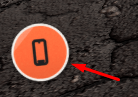
Look at the left side of the HUD for the Phone icon. Tap or click it. If nothing opens, make sure another menu (inventory, quest log, or rebirth panel) is closed first. On mobile, rotate to landscape if UI elements overlap.
2. Enter SHOP
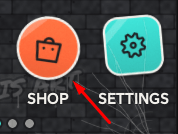
Inside the Phone UI, select SHOP. This is the same store where you browse upgrades for voice, sad face, sack, and sandals. Scroll if needed until you see promotional or code fields rather than only upgrade buttons.
3. Find “KETIK KODE DI SINI”
The redeem text box is labeled KETIK KODE DI SINI — Indonesian for “type the code here.” Homeless Simulator keeps several shop strings in Indonesian even for English-speaking servers. Do not hunt for an English-only “Enter Code” label; this field is the correct one.
4. Type the code carefully
Enter the code exactly as listed:
POSRONDA→ 300 Bottle Caps (never expires)BUKITSULTAN→ 500 Bottle Caps + 3 Tycoon EnvelopesAMPLOPSULTAN→ 20 Tycoon Envelopes
Avoid spaces before or after the string. Caps lock is usually fine; if a code fails, retry in uppercase.
5. Press REDEEM
Hit REDEEM and wait a moment. A success message or inventory bump should appear. Check bottle cap (tutup) and Tycoon Envelope counts to confirm. Close and reopen SHOP if the UI does not refresh immediately.
What good rewards look like
Bottle caps fund your core upgrades. Envelopes are denser progression items — save them when you are about to unlock a key upgrade tier or when you are pushing toward Cardboard King Access Cards. Do not panic-spend everything on sandals before improving begging power; the Begging Guide explains why voice and sad face usually come first.
Troubleshooting failed redeems
“Invalid” or no response
- Re-check spelling against the Codes Hub.
- Confirm the code is still listed as active (November 2026 table).
- Leave SHOP, close the Phone, wait five to ten seconds, then retry.
Button stays disabled
- Clear the field and retype.
- Ensure you are not mid-dialogue with an NPC or inside a cutscene-style quest prompt.
- Rejoin the server if the Phone UI freezes.
Already redeemed
Most codes work once per account. Seeing no reward after a second attempt usually means the first claim succeeded. Compare totals with a friend who has not redeemed yet.
Wrong game or old place
Homeless Simulator has had multiple Roblox experiences over time. Only redeem inside the Pos Ronda Riverbank Village place linked from this wiki. Scripts or guides aimed at older homeless simulators will not help with this shop UI.
Mobile keyboard covering REDEEM
Dismiss the keyboard slightly or zoom the UI so REDEEM remains tappable after typing.
After a successful redeem
- Note your new bottle cap balance.
- Buy early voice / sad face levels if you are still soft-begging on quiet streets.
- Claim daily or weekly quests while the Phone is open.
- Plan toward your first rebirth instead of buying every cosmetic.
- Bookmark Codes and Updates for the next drop.
Safety notes
Never share your Roblox password to “verify a code.” This wiki and Pos Ronda staff will not ask for account credentials. Avoid executors that promise auto-redeem; see the Scripts Hub for risk context. Codes are free progression — you do not need paid key shops.
Related reading
- Codes Hub — live table
- Getting Started — first-hour plan after claiming
- Players — badges and street tips that pair with early wealth
- Updates — when new codes usually appear
Master this Phone → SHOP → KETIK KODE DI SINI → REDEEM loop once, and every future Homeless Simulator code drop takes under a minute.
Frequently Asked Questions
Quick answers for Riverbank Village beggars and grinders.
Where is the code box in Homeless Simulator?
Open the Phone icon on the left, enter SHOP, then use the field labeled KETIK KODE DI SINI before pressing REDEEM.
Why is the shop text in Indonesian?
Pos Ronda Games ships several UI strings in Indonesian. The redeem field still works the same — type the English codes into KETIK KODE DI SINI.
My code said invalid. What now?
Check spelling on the Codes Hub, retry in uppercase, reopen the Phone Shop, or rejoin. If the code was retired, it will be marked expired on that page.
Can I redeem on mobile?
Yes. Use the same Phone → SHOP path. If the keyboard covers REDEEM, dismiss it slightly or rotate to landscape.